
The AI stack behind a one-person ecommerce business
In the last issue I gave you the big picture — what it looks like to run a business almost entirely on AI. This one goes deeper. These are the specific systems I've built and why they matter.

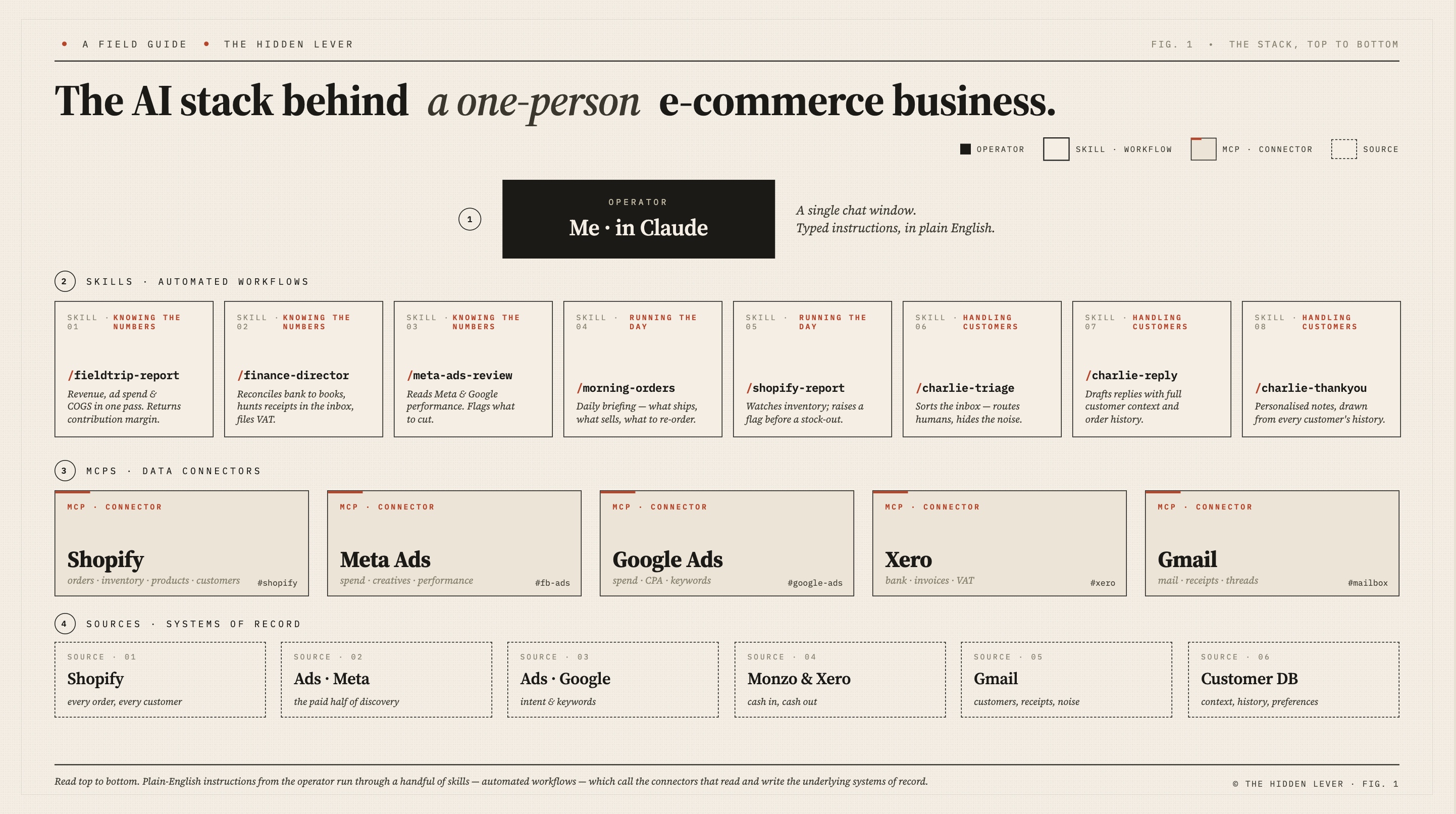
If you’re running an ecommerce business — selling physical products, running paid ads, handling customers, managing cash — the daily grind isn’t the product. It’s everything around the product. The spreadsheets, the reconciliation, the order management, the email, the constant monitoring of what’s working and what isn’t. That’s where most of the time goes. And for a solo founder, that’s time you’re not spending on the thing you actually started the business to do.
Over the past year I’ve built a set of systems using Claude Code that handle significant parts of this work. Not all of it - I’m not pretending AI runs my business while I sit on a beach. But the repetitive, cross-system, data-heavy tasks that used to eat up my days are mostly handled now.
I want to be clear about what I mean by “systems” here. This isn’t about asking Claude to do my thinking for me. It’s about hiring Claude to do some of my jobs for me — the ones I can explain clearly, with clear rules about what to do. Like an intern who’s joined the team. I’m not asking them to run the business, but they’re more than capable of crunching the numbers and drafting some emails.
A lot of people are writing about their AI setups at the moment (check out Josh Lachkovic’s excellent post about the systems he’s built, and I’d recommend reading it if you want a good explanation of the foundational concepts like skills and MCPs that I’m going to skip over here). But what I want to focus on is specifically what matters if you’re running an ecommerce business. The systems that make a difference when you’re selling physical products, running ads, and trying to keep the lights on.
Here’s what I’ve built.

Knowing the numbers
Contribution margin reporting
You can only build a successful business if you know your numbers — what you’re spending, what you’re earning, and crucially, what’s left over.
For an ecommerce business running paid ads, this is trickier to calculate than it should be. You know your cost of goods. But factoring in what you pay in payment processing fees, what you spend on postage, and then what you pay Meta and Google — that data is spread across three different systems that all report in different ways.
It’s not impossible to do manually. I did it for months. Every Monday morning I’d open Shopify and pull last week’s sales data. Then open Meta Ads Manager. Then Google Ads. Enter it all into a spreadsheet, drag the formulas down, and get my contribution margin — CM1 after product costs, CM2 after fulfilment, CM3 after ad spend.
There’s an advantage to doing it that way. The numbers go into your brain. You notice the patterns, you spot the issues, and I think it’s important for any founder to be across that kind of detail.
The problem is it took time. And not just the weekly ritual — if I wanted to compare this week to the same week last year, or look at the week to date I had to run the numbers manually every time.
So I gave Claude access to all three systems — Shopify, Meta, and Google (using MCPs - connectors that let Claude talk to external systems using a standard language) — and asked it to build a contribution margin waterfall that I can query whenever I want.
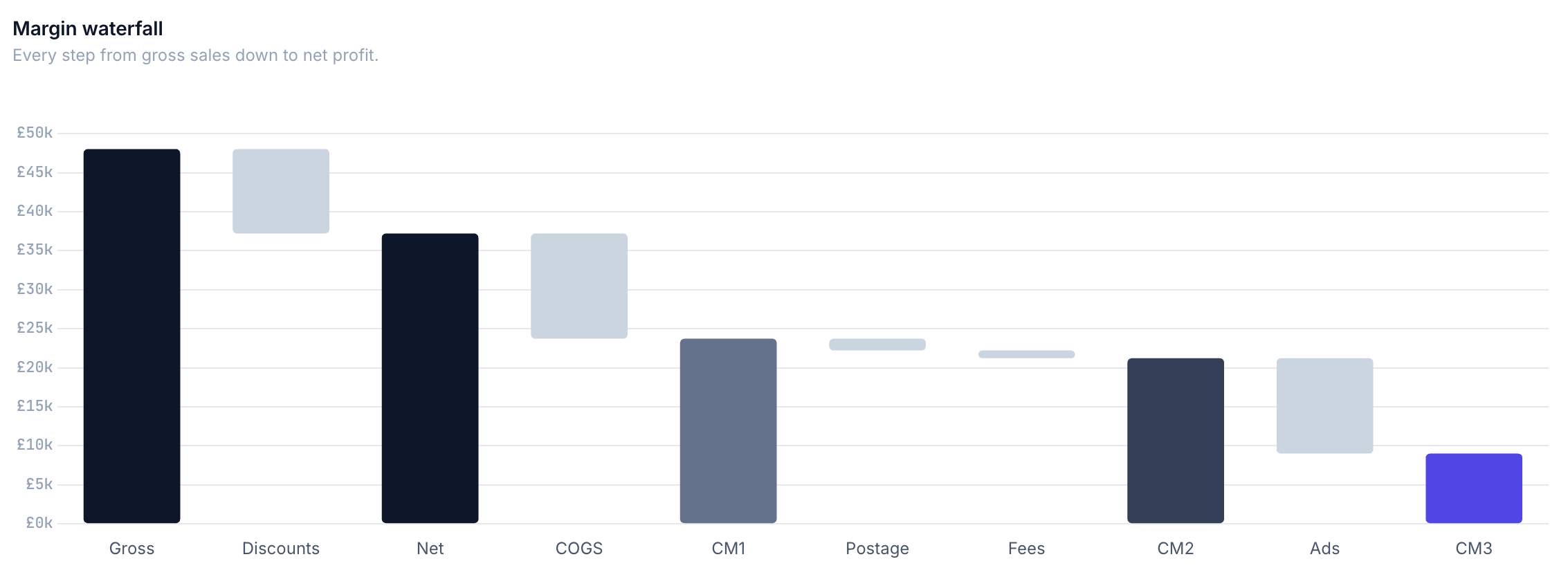
There are two levels to this. Level one is conversational: I ask Claude “what was our CM3 last week?” and it pulls the data, runs the calculations, and gives me the answer. That’s all you really need to start with, and it’s a massive step up from spreadsheets.
Level two is a dashboard. Claude built me a hosted web dashboard where I can browse the numbers properly, compare periods and see trends over time. You can run it locally on your machine, or if you want to share it with a team or access from other devices, then spend £5 a month on hosting and it’s live in the cloud.
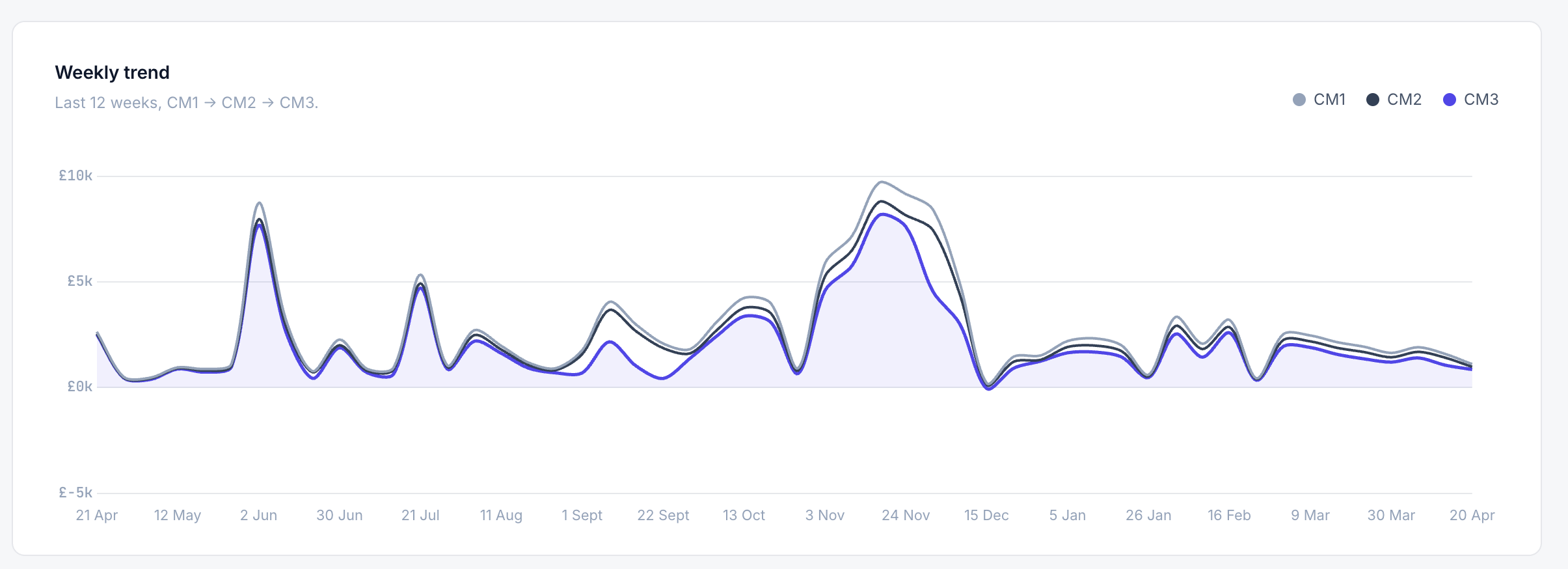
I’m including a downloadable system prompt with this issue that will walk you through building your own version of this. Hand it to your agent and it’ll guide you through the whole setup — no code knowledge needed (although you will need to go and do a few of the setup steps that the agent can’t do by itself, like registering for API access on shopify and meta).
Finance director
Small businesses live or die on cashflow, and not keeping a close enough eye on it was what killed my first startup. So one of the first systems I built was what I call the FD skill — a finance director that never sleeps.
It connects to our Monzo bank account and our Xero accounting system. It sees every transaction going in and out, cross-checks it against our accounting records, and knows which account code each transaction belongs to. Then it goes through my emails to find receipts and invoices, and figures out whether there’s VAT to reclaim.
The result is that I always know exactly where the cash is. Not approximately. Not “I’ll check at the end of the month.” Right now, at any point, I can ask and get a precise answer.
Running the day
Morning orders
By the time I sit down with a coffee in the morning, Claude has already looked at every unfulfilled order in Shopify. It separates the ones that need laser engraving from the ones that are ready to post straight away. It flags anything where stock is getting low. And it presents the whole thing as one structured view of the day’s work.
It’s like having an operations manager who gives you a quick rundown when you arrive in the office. Here’s what needs doing today, here’s what needs doing first, here’s what you should be thinking about ordering.
What this replaces is logging into Shopify, scrolling through orders, mentally sorting what needs what, and then checking stock levels in a completely separate system. That wasn’t difficult work, but it took time, mental energy, and delayed everything else.
Stock management
This one is simple but important. Claude connects to Sumtracker, our inventory management system, and monitors stock levels. When something starts running low, it flags it before it becomes a stockout.
For a one-person business, this matters more than you might think. When you’re spending the day engraving orders and packing parcels, it’s easy to lose track of what’s left on the shelf. Running out of stock on packaging because you were too busy fulfilling orders to notice it was getting low — that’s a real risk, and this helps catch it before it happens.
Ad performance
Every day I ask Claude how the ads performed, and it pulls data from both Meta and Google. It compares spend against my margin targets, calculates the CPA and ROAS across campaigns, and tells me what’s working and what I should probably cut.
The analysis is pretty good. It does in seconds what used to be 30 minutes of reviewing each account and campaign — the mechanical work of pulling numbers, comparing them against benchmarks, and spotting the outliers.
I will be honest about the limitation though. The recommendations are based on rules I’ve set — spend thresholds, CPA targets, ROAS floors. Sometimes the nuance of why an ad is underperforming needs a human eye.
Handling customers
Email triage
Like every founder, I’m constantly trying and failing to get to inbox zero. The biggest problem isn’t the emails that need a reply it’s the sheer volume of noise. Emails that don’t need any action at all, but they’re sitting there unread, mixed in with the ones that do. Supplier confirmations, automated notifications, newsletters I signed up for two years ago. They all take a few seconds to process, and those seconds add up.
So the email triage system goes through all my email accounts each morning and does a quick sort. No reply needed and not important? Straight to archive. No reply needed but I should see it? Into a review folder. Reply needed? Into the reply folder.
The thing that surprised me most was the ratio. The vast majority of email that hits my inbox needs no action at all. This system surfaces the twenty percent that actually matters and the rest is gone before I’ve even looked at it.
Customer context
This is the system that ties everything together. I’ve built a customer database that pulls in every customer email we receive, every email we send, every purchase, and every review. It knows who each customer is — whether they’re a first-time buyer or a returning customer, what they’ve bought before, what they said about it.
It remembers the gift you bought for the wedding last year, and reminds me when I’m sending you a thank you for your latest order.
That context feeds into other systems, particularly the thank you emails (see below), so that every touchpoint feels personal without me having to manually look up someone’s order history before writing to them.
Thank you emails
I’ve always written personal thank you emails to every customer. It’s one of the things that makes Fieldtrip feel different from buying from a faceless brand — you order a cup, and you get a real email from the founder. But as the business has grown, doing this manually has become harder and harder.
So Claude drafts them for me. Every morning, before I wake up, it writes a personalised thank you email for every order that came in overnight. Each one written in my voice, referencing whether someone’s a returning customer, whether they’ve ordered engraving, what they bought last time. I review each one, tweak as needed, and send.
What’s next
These are the systems I’ve started with, because they save me time every single day. One of the biggest challenges I find is that it’s addictive — you have this superpower to build any system you need, but it still takes time and work to do it properly. So which system do I build next? I’m still working on how to make that decision.
I’m including a system prompt file with this issue that you can feed directly into your own agent, and they’ll guide you through setting up your own versions of the CM3 contribution margin dashboard. If you try it I’d love to know how you get on.
Plus if there’s a system here you’d like to see in more detail — how it actually works under the hood, how to build it, what I learned along the way — let me know. I’m happy to go deep on the ones people actually want to see.
If you know an ecommerce founder who’d find this useful, please send it their way.
Tristan
Great post Tristan and thanks for the 🔗